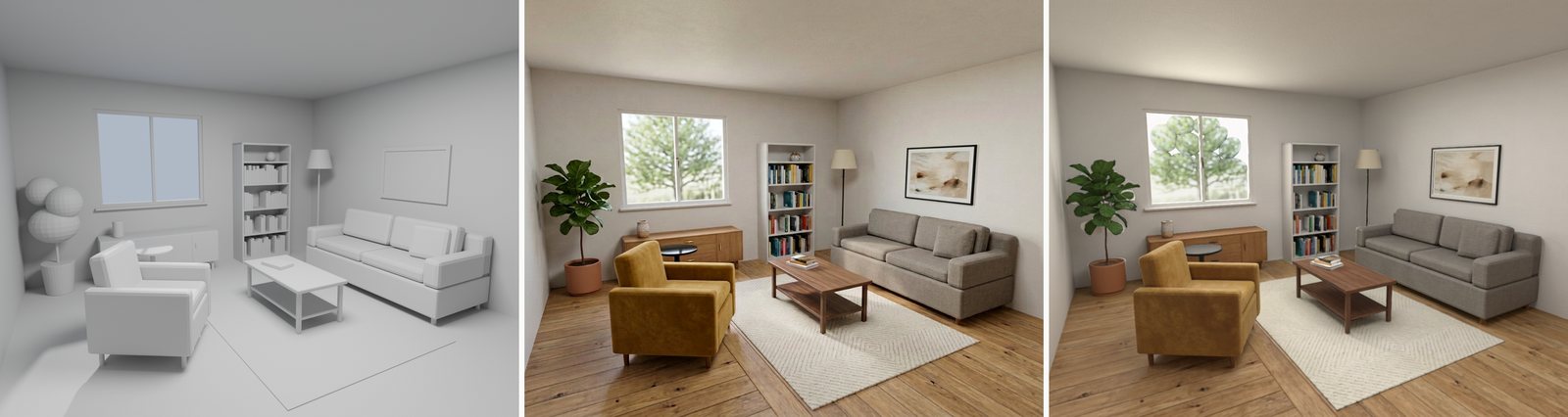
A grey 3D room already contains a lot of decisions: where the sofa goes, how tall the window is, which way the camera looks. Making it feel real adds another set of decisions about materials, texture, light and surface detail.
An image model can propose those decisions quickly. The harder part is getting them back into the room so you can move the camera, edit an object or change the light.
Blockout 2 Real is an open-source skill and toolkit for that loop. It generates a photographic target from a grey scene, decomposes the image into material and geometry estimates, writes the look into Blender, then fits lights against a real Cycles re-render.
Imagine the room from its own camera
The starting point is a grey blockout with a fixed view. Each object gets an identity, UVs and a description. The workflow can ingest a Blender scene, common mesh formats or a scene specification made from primitives.
Nano Banana 2 proposes a photographic version of that view. The target is conditioned with scene information through a five-level ladder; the workflow selects the weakest level whose image edges still align with the object-id mask.
The alignment rule is only a first check. An image model can change an object while retaining a plausible outline, so the agent still has to inspect the overlays. If the reference invents a different table, the original table does not become that object simply because a texture fits its screen position.
Take the image apart before putting it back
A photograph contains both surface appearance and illumination. If a sun patch becomes part of a floor's base color, it stays painted there when you move the light.
The pipeline estimates those components separately. Marigold V2 supplies albedo information, MoGe-3 supplies depth and normals, and PATINA contributes material estimates. The maps are checked before use. In the first room, PATINA's roughness followed the lighting, so that estimate was rejected in favor of local Marigold-IID Appearance roughness.
Those outputs remain estimates. A glossy black side table still rendered too grey, and the replacement roughness map was blurry. Splitting an image into maps makes the assumptions inspectable; it does not make them exact.
The maps are back-projected into each object's UV coordinates through the known camera. Visibility checks prevent sampling through an occluder, and object ids prevent one surface from borrowing another object's pixels. Unseen texels are filled from the same object's visible samples, with coverage recorded.
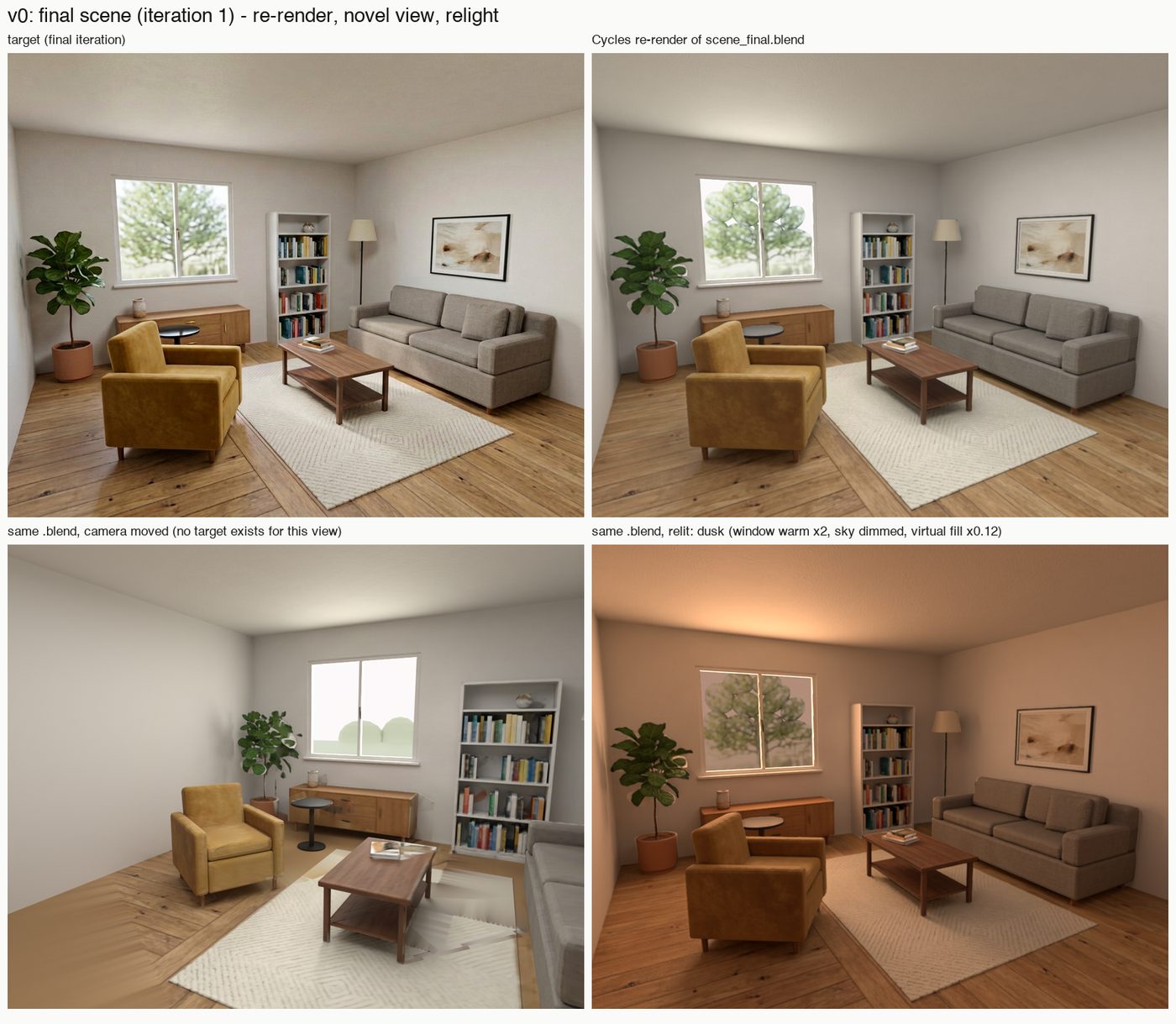
That produces ordinary textures and Principled BSDF materials attached to the objects. It also explains why a new camera can expose smeared or flat-filled areas that the original view never constrained.
Fit lights with the renderer in the loop
Materials alone do not reproduce the target. The workflow renders candidate lights individually in Cycles, using the scene's actual materials, then solves for non-negative light strengths and colors. Lights that contribute little are pruned, and alternative pruning settings are compared against the target.
The final living-room fit uses a window area light, sky and a hidden ceiling fill. Their recorded image-energy shares are roughly 34%, 11% and 55%. More than half the illumination comes from that virtual fill.
That is useful to know when editing the result. The rig approximates the image's lighting; it is not a recovered measurement of a real room's light sources. The scene still has editable lights whose contribution can be examined individually.
Keep the target from moving the goalposts
The first room went through three iterations. Each produced a new generated target, a re-render and an error map. LPIPS-AlexNet, a perceptual image-distance metric, guided comparisons; lower values mean closer images under that metric.
A changing target makes the numbers tricky. A better score against a new picture might mean that the new picture became easier, rather than that the scene improved.
The workflow therefore scores every scene against every target. In the recorded matrix, the mean distances across the three targets were 0.171, 0.145 and 0.150 for scenes 0, 1 and 2. Scene 1 was retained. Scene 2's finer foliage looked like dots and did not improve the overall comparison.
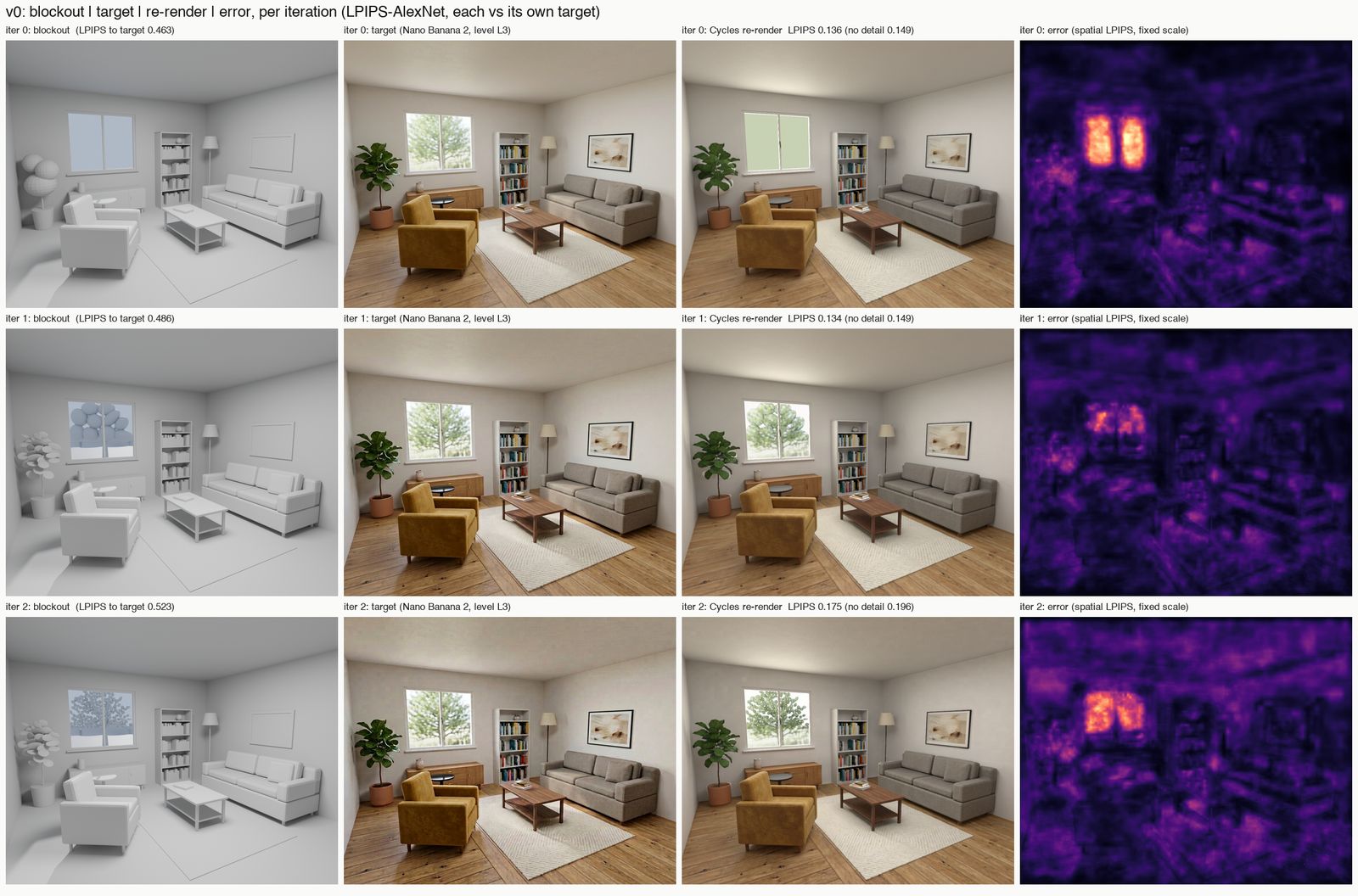
The selected scene scores 0.134 against its own target, including the detail-bump pass. That number describes one view under one metric. The tree still reads as textured ellipsoids, contact shadows are weak, and some bump detail is fitted to that camera.
Fresh visual critique provides another kind of evidence. It can identify an implausible plant or an obvious geometry mismatch that an aggregate distance does not explain. Those observations feed the next round of scene edits.
Put a different scene through it
A second test used a home-office corner with a different layout, its own camera, modifiers, an instanced collection, a curve and existing lights. The same commands ran one iteration without code changes.
Its LPIPS distance to the target went from 0.574 for the grey blockout to 0.281 for the re-render, then 0.222 with detail bump. The final scene contained 31 mesh objects and 182 packed textures.
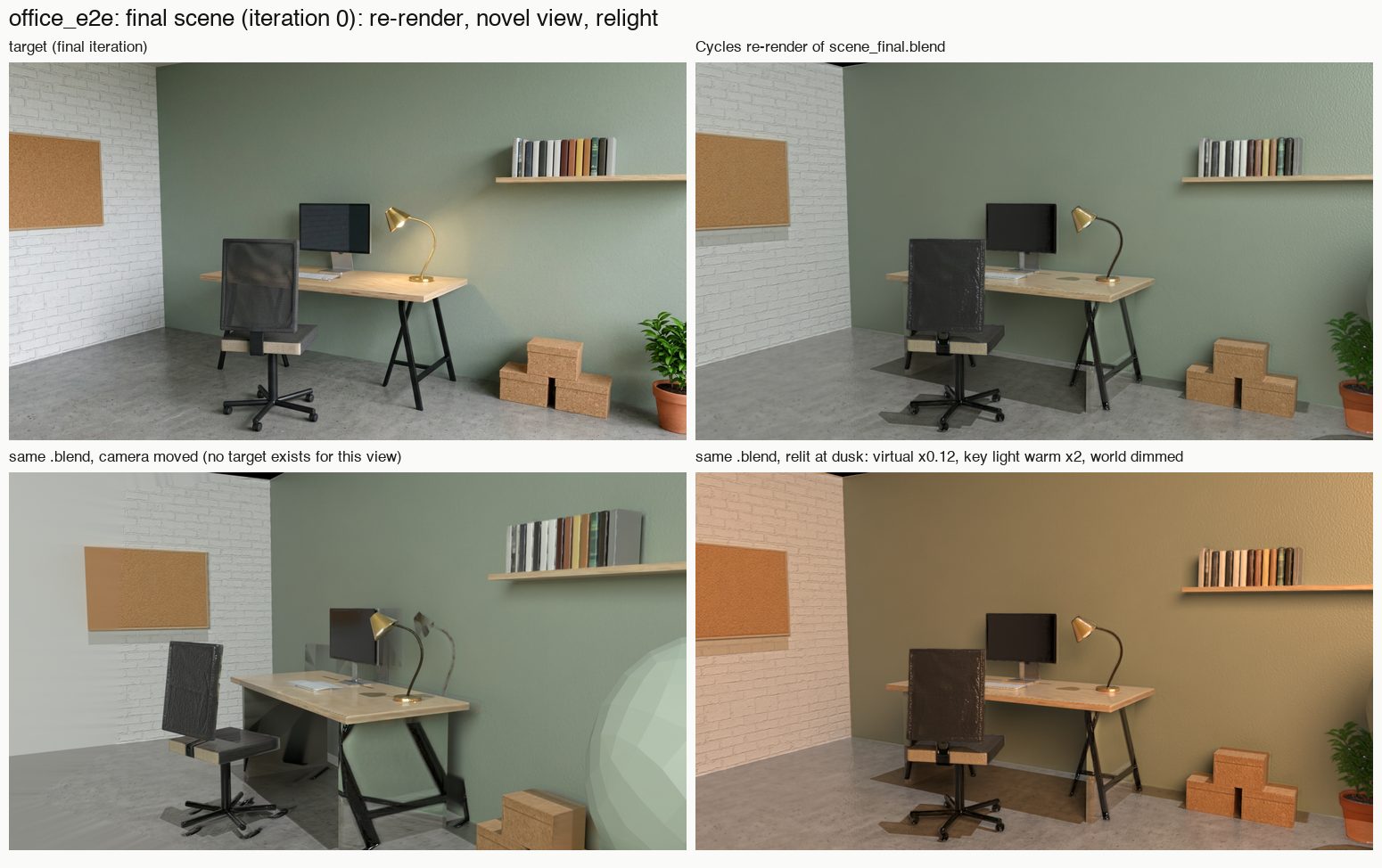
This test also makes the failure mode clear. The generator imagined A-frame desk supports where the blockout had slab legs and moved the plant. Back-projection put those appearances onto the geometry that existed. The critique-and-edit loop is needed to address that mismatch.
Keep the scene after the image
Install the skill for a supported coding agent:
npx skills add gokayfem/blockout-to-realThe repository documents Python dependencies, Blender 5.2+, ffmpeg and the fal key required for target generation and decomposition. A supplied image of the exact view can replace the generated target, while the remaining stages still prepare and fit the scene.
The delivered living room is a normal Blender file with 20 mesh objects, per-object materials, packed textures and fitted lights. It uses no image planes, emission shaders or compositor to paste the target over the render.
The current workflow is fitted to a single view. Glass, mirrors, animation and multi-camera consistency need further work. Moving the camera is possible, but surfaces outside the target's view have weaker evidence.
What interests me is keeping the useful part of the image model's proposal inside an editable world. The generated picture gives the room a direction. The Blender scene lets you continue making decisions after that first picture looks good.